21cmEMUv2: Adding Radio Background
In this tutorial we demonstrate how to use the emulator that was trained on a 21cmFAST model which includes a radio background (see Cang+24 for more details).
[1]:
import matplotlib.patches as mpatches
import matplotlib.pyplot as plt
import numpy as np
from matplotlib import rcParams

rcParams.update({"font.size": 12})

from corner import corner

from py21cmemu import Emulator
[2]:
with np.load("Radio_Test_data_sample.npz") as f:
    test_params = f["params"]
    test_Tb = f["Tb"]
    test_Tr = f["Tr"]
    test_PS = f["PS"]
    test_xHI = f["xHI"]
    test_tau = f["tau"]
    PS_k = f["PS_k"]
    PS_z = f["PS_z"]
    test_z = f["redshifts"]
    zs = f["redshifts"]
emulator="radio_background" when initialising the Emulator class.emulator is specified, then the default emulator is loaded.[3]:
emu = Emulator(emulator="radio_background")
After initialising the Emulator class correctly, the rest of the calls are exactly the same as for the default emulator:
[4]:
normed_input_params, output, output_errors = emu.predict(test_params)
The outputs can be accessed in the same way as for the default emulator:
[5]:
print("Summaries returned by the radio_background emulator are: ", list(output.keys()))
print(
    "Shape of radio background temperature summary output: [Nsamples, N redshift bins] = ",
    output.Tr.shape,
)
Summaries returned by the radio_background emulator are:  ['Tb', 'xHI', 'Tr', 'PS', 'tau']
Shape of radio background temperature summary output: [Nsamples, N redshift bins] =  (1000, 103)
You can inspect which parameters must be supplied in log10 space using LOG_PARAMETERS, and the full parameter list with units via PARAMETERS:
[ ]:
from py21cmemu.inputs import RadioEmulatorInput

radio_in = RadioEmulatorInput()

print("All parameters and their units:")
for name, unit in radio_in.PARAMETERS.items():
    marker = " ← log10 input required" if name in radio_in.LOG_PARAMETERS else ""
    print(f"  {name:15s}  [{unit}]{marker}")
[ ]:
# The test parameters are already in the correct physical space:
# fR_mini, L_X_MINI, F_STAR7_MINI, F_ESC7_MINI are in log10 space
# A_LW is linear
print("Test parameter column order:", radio_in.astro_param_keys)
print("First test param:", test_params[0])
You can also normalize/un-normalize parameters using RadioEmulatorInput.normalize() and undo_normalization(), which map physical parameters to the internal [0, 1] range used by the emulator. This is useful if you want to inspect the normalized parameter space.
[ ]:
# Normalize physical params to [0,1] internal range
normed_params = radio_in.normalize(test_params)
print(
    "Normalized param range (should be [0,1]):",
    normed_params.min().round(3),
    "–",
    normed_params.max().round(3),
)

# Recover physical params from normalized (round-trip check)
recovered = radio_in.undo_normalization(normed_params)
print("Round-trip recovery max abs error:", np.abs(recovered - test_params).max())
True
[9]:
# Calculate fractional error (FE)
def print_fe(pred, true, name="", ret=False, floor=None):
    if floor is not None:
        m = abs(true) < floor
        true_final = true.copy()
        true_final[m] = floor
    else:
        true_final = true

    frac_err = abs((pred - true) / true_final) * 100.0
    print(
        "FE (%) "
        + name
        + ": Median: %.4f, 68%%CI: %.4f, 95%%CI: %.4f"
        % tuple(np.nanpercentile(frac_err, [50, 84, 97.5]))
    )
    print(
        "Abs diff "
        + name
        + ": Median: %.5f, 68%%CI: %.5f, 95%%CI: %.5f"
        % tuple(np.nanpercentile(abs(pred - true), [50, 84, 97.5]))
    )

    print("FE " + name + " STD: %.3f" % np.nanstd(frac_err))
    if ret:
        return frac_err
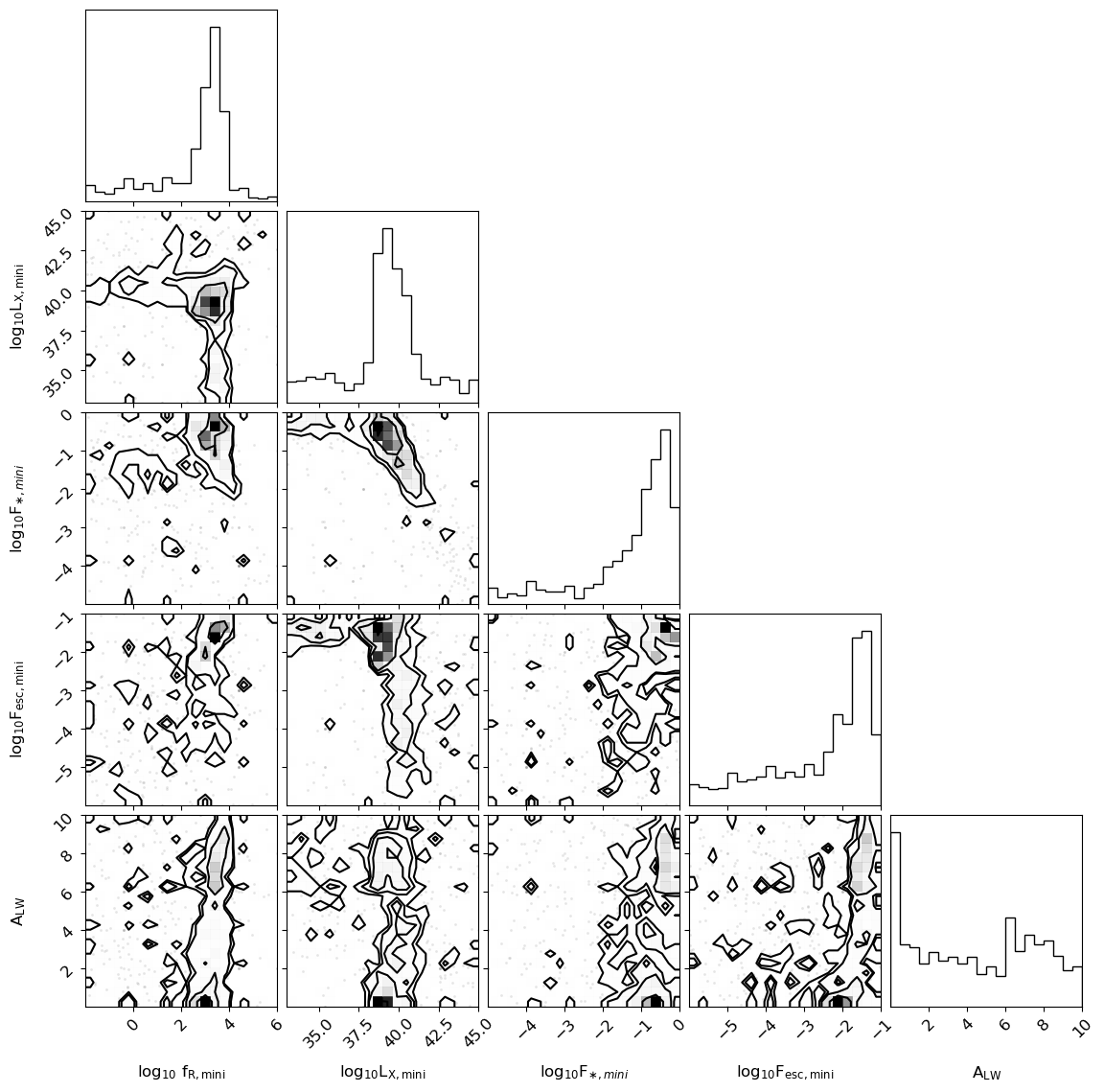
First, we can look at the parameter distribution of the test set sample provided:
[11]:
labels = output.properties.parameter_labels
corner(test_params, labels=labels)
plt.show()
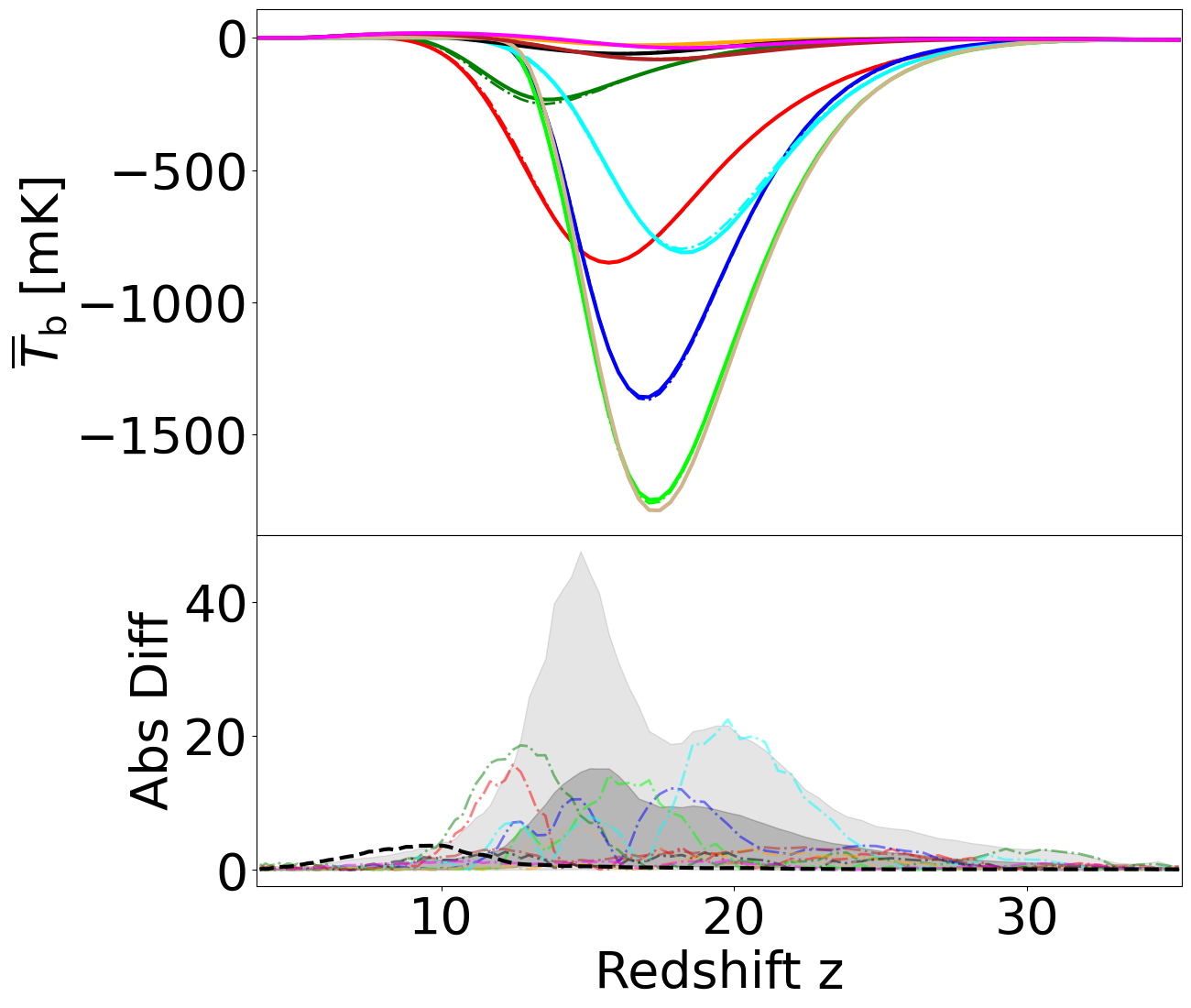
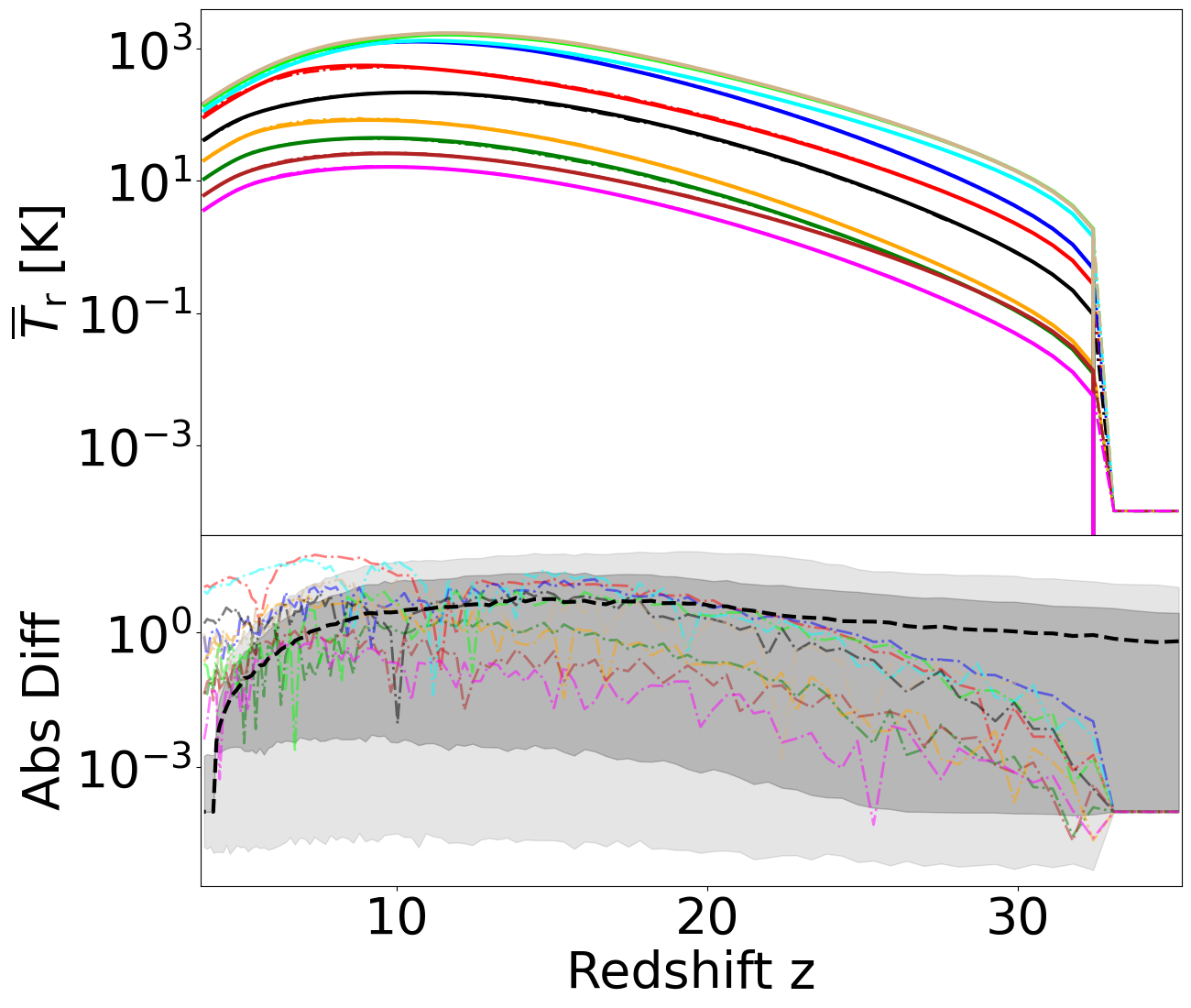
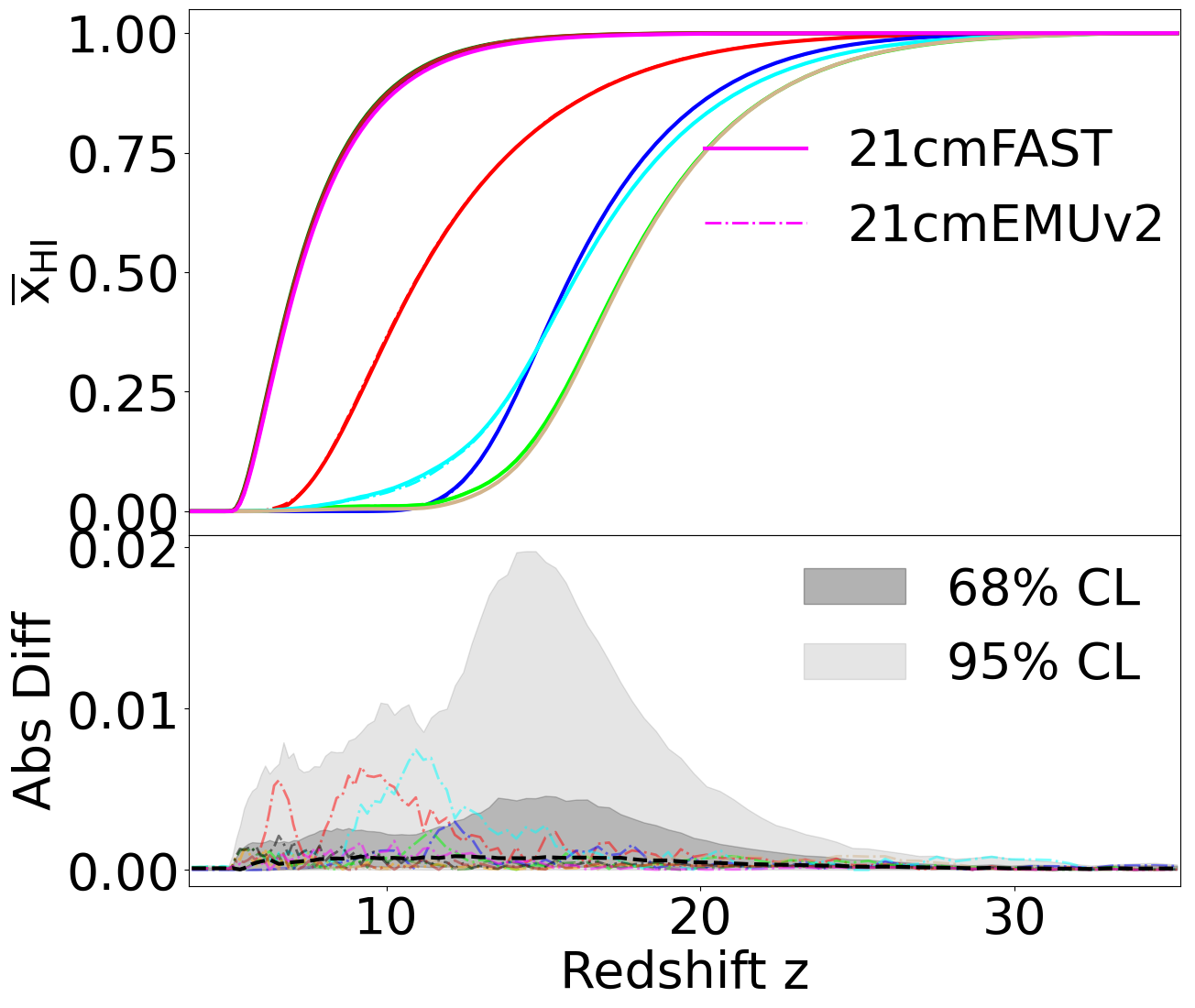
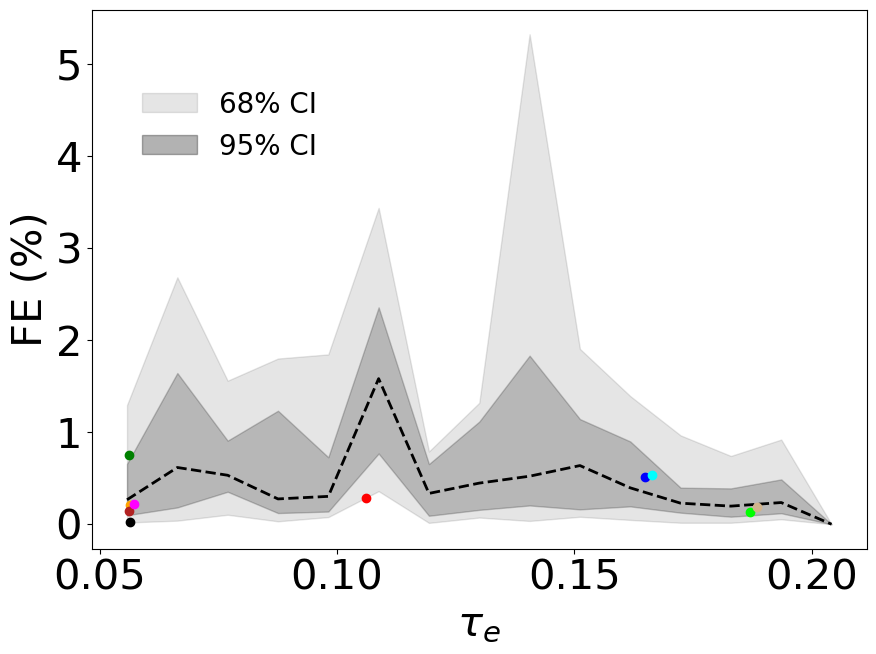
Next, we can calculate the emulator performance (fractional error) on each summary and display the median, 68%, and 95% confidence limits:
[ ]:
# print performance
Tb_frac_err = print_fe(output.Tb.value, test_Tb, name="Tb", ret=True, floor=5)
FE (%) Tb: Median: 2.4298, 68%CI: 9.1370, 95%CI: 29.9726
Abs diff Tb: Median: 0.46664, 68%CI: 3.01442, 95%CI: 14.78150
FE Tb STD: 11.082
[ ]:
Tr_frac_err = print_fe(output.Tr.value, test_Tr, name="Tr", ret=True, floor=1e-4)
FE (%) Tr: Median: 1.3364, 68%CI: 4.7003, 95%CI: 99.9828
Abs diff Tr: Median: 0.79453, 68%CI: 9.19828, 95%CI: 35.84473
FE Tr STD: 22.876
[ ]:
xHI_frac_err = print_fe(output.xHI.value, test_xHI, name="xHI", ret=True, floor=1e-3)
FE (%) xHI: Median: 0.1890, 68%CI: 11.3611, 95%CI: 71.3078
Abs diff xHI: Median: 0.00030, 68%CI: 0.00162, 95%CI: 0.00793
FE xHI STD: 67.385
[ ]:
PS_frac_err = print_fe(output.PS.value, test_PS, name="PS", ret=True, floor=1e-2)
FE (%) PS: Median: 3.4283, 68%CI: 17.7266, 95%CI: 69.1445
Abs diff PS: Median: 0.03751, 68%CI: 27.25376, 95%CI: 6927.05156
FE PS STD: 59.203
[ ]:
tau_frac_err = print_fe(output.tau.value, test_tau, name="tau", ret=True)
FE (%) tau: Median: 0.2742, 68%CI: 0.7194, 95%CI: 1.6971
Abs diff tau: Median: 0.00032, 68%CI: 0.00085, 95%CI: 0.00211
FE tau STD: 0.526
We calculate the absolute errors of each summary for the plots:
[ ]:
xHI_diff = abs(output.xHI.value - test_xHI)
diff_err_xHI_z = np.nanpercentile(xHI_diff, [2.5, 16, 50, 84, 97.5], axis=0)

PS_diff = abs(output.PS.value - test_PS)
diff_err_PS_z = np.nanpercentile(PS_diff, [2.5, 16, 50, 84, 97.5], axis=0)

Tb_diff = abs(output.Tb.value - test_Tb)
diff_err_Tb_z = np.nanpercentile(Tb_diff, [2.5, 16, 50, 84, 97.5], axis=0)

Tr_diff = abs(output.Tr.value - test_Tr)
diff_err_Tr_z = np.nanpercentile(Tr_diff, [2.5, 16, 50, 84, 97.5], axis=0)

tau_diff = abs(output.tau.value - test_tau)
N = 10 examples at a time.[18]:
idxs = np.arange(test_tau.shape[0])
np.random.seed(42)
np.random.shuffle(idxs)
[19]:
N = 10
idxs = idxs[:N]
[20]:
cs = ["r", "g", "b", "lime", "cyan", "orange", "k", "tan", "firebrick", "magenta"]
[ ]:
rcParams.update({"font.size": 40})

fig, axs = plt.subplots(
    nrows=2,
    ncols=1,
    sharex=True,
    figsize=(14, 12),
    gridspec_kw=dict(height_ratios=[3, 2], hspace=0),
)
axs = axs.flatten()

# inset axes...
# axins = axs[1].inset_axes([0.35, 0.2, 0.6, 0.47])

for i, c in zip(idxs, cs, strict=False):
    if i == N - 1:
        labels = ["21cmEMU", "Test Set"]
    else:
        labels = [None, None]
    axs[0].plot(zs, test_Tb[i, :], lw=3, color=c, label=labels[1])
    axs[1].plot(zs, Tb_diff[i, :], ls="-.", alpha=0.5, lw=2, color=c)
    axs[0].plot(zs, output.Tb[i, :].value, lw=2, ls="-.", color=c, label=labels[0])

axs[1].plot(zs, diff_err_Tb_z[2, :][::-1], ls="--", lw=3, color="k", label=r"Median")
axs[1].fill_between(
    zs, diff_err_Tb_z[1, :], diff_err_Tb_z[3, :], color="k", alpha=0.2, label=r"68% CI"
)
axs[1].fill_between(
    zs, diff_err_Tb_z[0, :], diff_err_Tb_z[4, :], color="k", alpha=0.1, label=r"95% CI"
)


axs[0].set_ylabel(r"$\overline{T}_{\rm{b}}$ [mK]")
axs[1].set_ylabel(r"Abs Diff")
axs[1].set_xlabel(r"Redshift z")
axs[1].tick_params(axis="both", which="major")
axs[1].tick_params(axis="both", which="minor")
axs[0].tick_params(axis="y", which="major")
axs[0].tick_params(axis="y", which="minor")
axs[0].set_xlim(zs[0] - 0.1, zs[-1] + 0.1)

plt.tight_layout()
plt.show()
[ ]:
rcParams.update({"font.size": 40})

fig, axs = plt.subplots(
    nrows=2,
    ncols=1,
    sharex=True,
    figsize=(14, 12),
    gridspec_kw=dict(height_ratios=[3, 2], hspace=0),
)
axs = axs.flatten()

for i, c in zip(idxs, cs, strict=False):
    if i == N - 1:
        labels = ["21cmEMU", "Test Set"]
    else:
        labels = [None, None]
    axs[0].plot(zs, test_Tr[i, :], lw=3, color=c, label=labels[1])
    axs[1].plot(zs, Tr_diff[i, :], ls="-.", alpha=0.5, lw=2, color=c)
    axs[0].plot(zs, output.Tr[i, :].value, lw=2, ls="-.", color=c, label=labels[0])

axs[1].plot(zs[::-1], diff_err_Tr_z[2, :], ls="--", lw=3, color="k", label=r"Median")
axs[1].fill_between(
    zs,
    diff_err_Tr_z[1, :],
    diff_err_Tr_z[3, :][::-1],
    color="k",
    alpha=0.2,
    label=r"68% CI",
)
axs[1].fill_between(
    zs,
    diff_err_Tr_z[0, :],
    diff_err_Tr_z[4, :][::-1],
    color="k",
    alpha=0.1,
    label=r"95% CI",
)


axs[0].set_ylabel(r"$\overline{T}_{\rm{r}}$ [K]")
axs[1].set_ylabel(r"Abs Diff")
axs[1].set_xlabel(r"Redshift z")
axs[1].tick_params(axis="both", which="major")
axs[1].tick_params(axis="both", which="minor")
axs[0].tick_params(axis="y", which="major")
axs[0].tick_params(axis="y", which="minor")
axs[0].set_xlim(zs[0] - 0.1, zs[-1] + 0.1)
axs[0].set_yscale("log")
axs[1].set_yscale("log")

plt.tight_layout()
plt.show()
[ ]:
rcParams.update({"font.size": 40})

fig, axs = plt.subplots(
    nrows=2,
    ncols=1,
    sharex=True,
    figsize=(14, 12),
    gridspec_kw=dict(height_ratios=[3, 2], hspace=0),
)
axs = axs.flatten()

# inset axes...
# axins = axs[1].inset_axes([0.35, 0.2, 0.6, 0.47])

for i, c, num in zip(idxs, cs, range(N), strict=False):
    if num == N - 1:
        labels = ["21cmEMUv2", "21cmFAST"]
    else:
        labels = [None, None]
    axs[0].plot(zs, test_xHI[i, :], lw=3, color=c, label=labels[1])
    axs[1].plot(zs, xHI_diff[i, :], ls="-.", alpha=0.5, lw=2, color=c)
    axs[0].plot(zs, output.xHI[i, :].value, lw=2, ls="-.", color=c, label=labels[0])

axs[0].legend(loc=(0.5, 0.5), frameon=False)  # framealpha=0.3)
axs[1].plot(zs, diff_err_xHI_z[2, :], ls="--", lw=3, color="k", label=r"Median")
axs[1].fill_between(
    zs,
    diff_err_xHI_z[1, :],
    diff_err_xHI_z[3, :],
    color="k",
    alpha=0.2,
    label=r"68% CI",
)
axs[1].fill_between(
    zs,
    diff_err_xHI_z[0, :],
    diff_err_xHI_z[4, :],
    color="k",
    alpha=0.1,
    label=r"95% CI",
)

handles = [
    mpatches.Patch(color="k", label="68% CL", alpha=0.3),
    mpatches.Patch(color="k", label="95% CL", alpha=0.1),
]
plt.legend(handles=handles, loc=(0.6, 0.5), frameon=False)
axs[0].set_ylabel(r"$\overline{\mathrm{x}}_{\rm{HI}}$")
axs[1].set_ylabel(r"Abs Diff")
axs[1].set_xlabel(r"Redshift z")

plt.xlim(zs[0] - 0.1, zs[-1] + 0.1)

plt.tight_layout()
plt.show()
We plot the redshift evolution of the 21-cm power spectrum around scales \(k \sim 0.1 \rm{Mpc}^{-1}\):
[24]:
kbin = 11
PS_k[kbin]
[24]:
0.10969735366408447
[ ]:
rcParams.update({"font.size": 40})

fig, axs = plt.subplots(
    nrows=2,
    ncols=1,
    sharex=True,
    figsize=(14, 12),
    gridspec_kw=dict(height_ratios=[3, 2], hspace=0),
)
axs = axs.flatten()


for i, c, num in zip(idxs, cs, range(N), strict=False):
    if num == N - 1:
        labels = ["21cmEMUv2", "21cmFAST"]
    else:
        labels = [None, None]
    axs[0].plot(PS_z, test_PS[i, :, kbin], lw=3, color=c, label=labels[1])
    axs[1].plot(PS_z, PS_diff[i, :, kbin], ls="-.", alpha=0.5, lw=2, color=c)
    axs[0].plot(
        PS_z, output.PS[i, :, kbin].value, lw=2, ls="-.", color=c, label=labels[0]
    )

axs[0].legend(loc=(0.25, 0.01), frameon=False)  # framealpha=0.3)
axs[1].plot(PS_z, diff_err_PS_z[2, :, kbin], ls="--", lw=3, color="k", label=r"Median")
axs[1].fill_between(
    PS_z,
    diff_err_PS_z[1, :, kbin],
    diff_err_PS_z[3, :, kbin],
    color="k",
    alpha=0.2,
    label=r"68% CI",
)
axs[1].fill_between(
    PS_z,
    diff_err_PS_z[0, :, kbin],
    diff_err_PS_z[4, :, kbin],
    color="k",
    alpha=0.1,
    label=r"95% CI",
)

handles = [
    mpatches.Patch(color="k", label="68% CL", alpha=0.3),
    mpatches.Patch(color="k", label="95% CL", alpha=0.1),
]
plt.legend(handles=handles, loc=(0.6, 0.01), frameon=False)
axs[0].set_ylabel(r"$\Delta_{21}^2$ [mK$^2$]")
axs[1].set_ylabel(r"Abs Diff")
axs[1].set_xlabel(r"Redshift z")

axs[0].set_yscale("log")
axs[1].set_yscale("log")

plt.xlim(PS_z[0] - 0.1, PS_z[-1] + 0.1)

plt.tight_layout()
plt.show()
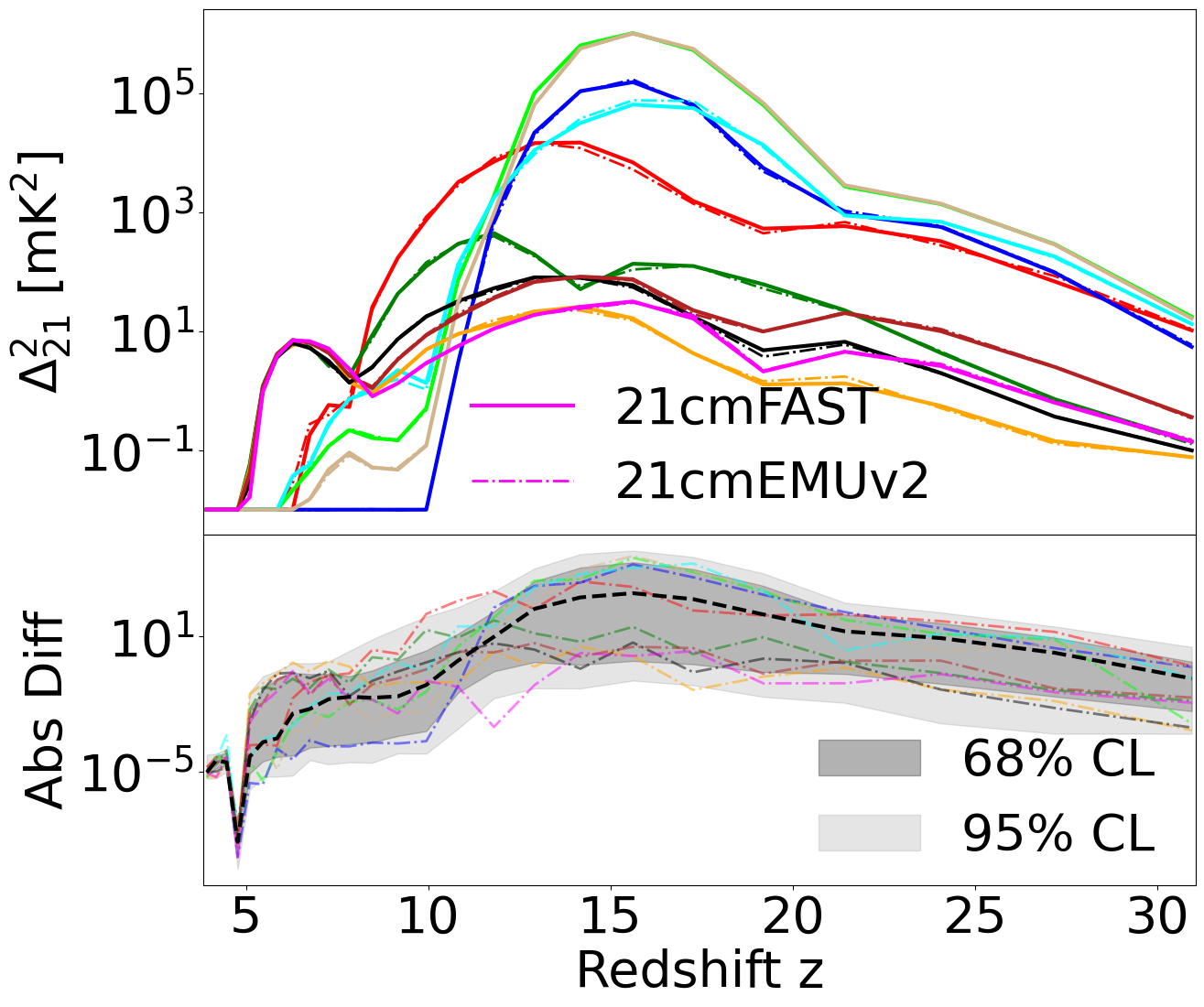
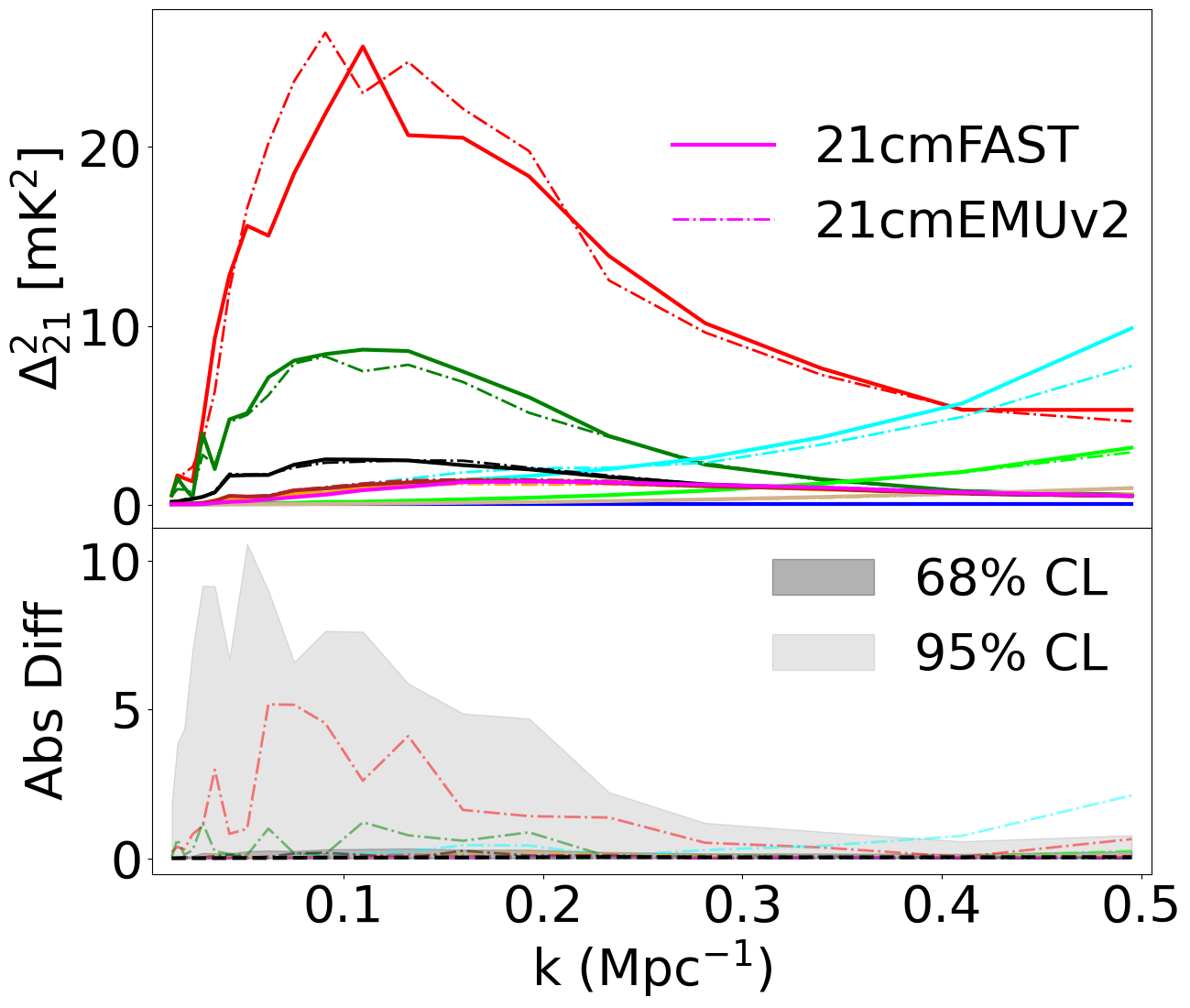
Now we plot the 21-cm power spectrum evolution at a fixed redshift of about \(z \sim 8.5\).
[27]:
zbin = 11
PS_z[zbin]
[27]:
8.46594037485638
[ ]:
rcParams.update({"font.size": 40})

fig, axs = plt.subplots(
    nrows=2,
    ncols=1,
    sharex=True,
    figsize=(14, 12),
    gridspec_kw=dict(height_ratios=[3, 2], hspace=0),
)
axs = axs.flatten()

for i, c, num in zip(idxs, cs, range(N), strict=False):
    if num == N - 1:
        labels = ["21cmEMUv2", "21cmFAST"]
    else:
        labels = [None, None]
    axs[0].plot(PS_k, test_PS[i, zbin, :], lw=3, color=c, label=labels[1])
    axs[1].plot(PS_k, PS_diff[i, zbin, :], ls="-.", alpha=0.5, lw=2, color=c)
    axs[0].plot(
        PS_k, output.PS[i, zbin, :].value, lw=2, ls="-.", color=c, label=labels[0]
    )

axs[0].legend(loc=(0.5, 0.5), frameon=False)  # framealpha=0.3)
axs[1].plot(PS_k, diff_err_PS_z[2, zbin, :], ls="--", lw=3, color="k", label=r"Median")
axs[1].fill_between(
    PS_k,
    diff_err_PS_z[1, zbin, :],
    diff_err_PS_z[3, zbin, :],
    color="k",
    alpha=0.2,
    label=r"68% CI",
)
axs[1].fill_between(
    PS_k,
    diff_err_PS_z[0, zbin, :],
    diff_err_PS_z[4, zbin, :],
    color="k",
    alpha=0.1,
    label=r"95% CI",
)

handles = [
    mpatches.Patch(color="k", label="68% CL", alpha=0.3),
    mpatches.Patch(color="k", label="95% CL", alpha=0.1),
]
plt.legend(handles=handles, loc=(0.6, 0.5), frameon=False)
axs[0].set_ylabel(r"$\Delta_{21}^2$ [mK$^2$]")
axs[1].set_ylabel(r"Abs Diff")
axs[1].set_xlabel(r"k (Mpc$^{-1}$)")

plt.xlim(PS_k[0] - 1e-2, PS_k[-1] + 1e-2)

plt.tight_layout()
plt.show()
[31]:
tau_bins = np.linspace(min(test_tau), np.percentile(test_tau, 99.0), 15)
tau_binned_fe = np.zeros(len(tau_bins))
tau_binned_fe_68 = np.zeros((len(tau_bins), 2))
tau_binned_fe_95 = np.zeros((len(tau_bins), 2))
[32]:
for i in range(len(tau_bins) - 1):
    mask = np.logical_and(test_tau >= tau_bins[i], test_tau < tau_bins[i + 1])
    low1, low, med, high, high1 = np.nanpercentile(
        tau_frac_err[mask], [2.5, 16, 50, 84, 97.5]
    )
    tau_binned_fe[i] = med
    tau_binned_fe_68[i, :] = [low, high]
    tau_binned_fe_95[i, :] = [low1, high1]
[ ]:
plt.figure(figsize=(10, 7))
rcParams.update({"font.size": 30})
plt.plot(tau_bins, tau_binned_fe, color="k", lw=2, ls="--")
plt.fill_between(
    tau_bins, tau_binned_fe_68[:, 0], tau_binned_fe_68[:, 1], color="k", alpha=0.2
)
plt.fill_between(
    tau_bins, tau_binned_fe_95[:, 0], tau_binned_fe_95[:, 1], color="k", alpha=0.1
)

for i in range(N):
    plt.scatter(
        output.tau[idxs[i]].value,
        tau_frac_err[idxs[i]],
        color=cs[i],
        marker="o",
        zorder=2,
    )
plt.xlabel(r"$\tau_e$")
handles = [
    mpatches.Patch(color="k", label="68% CI", alpha=0.1),
    mpatches.Patch(color="k", label="95% CI", alpha=0.3),
]
plt.legend(handles=handles, loc=(0.05, 0.7), frameon=False, fontsize=20)
plt.ylabel("FE (%)")
plt.show()
Using the RadioEmulatorErrors Class
The predict() method returns error statistics as its third output. For the Radio emulator, these are provided as RadioEmulatorErrors, containing median fractional errors (FE%) from the test set.
The Radio emulator has a different output set than the ACG emulator:
Includes:
Tr_err(radio temperature) - specific to this emulatorDoes not include:
Ts_err(spin temperature),UVLFs_err(UV luminosity functions)
These errors represent the typical percentage accuracy at each (redshift, k-mode) bin.
[ ]:
# Inspect the error object
print(f"Error type: {type(output_errors).__name__}")
print(f"\nAvailable error fields: {output_errors.keys()}")
print(f"\nError summary:\n{output_errors.summary()}")
Radio Temperature Error (Unique to this Emulator)
The Tr_err field contains the fractional error for the radio background temperature \(T_r\). This quantity is only available in the Radio emulator and represents the contribution from high-redshift radio sources to the background radiation.
[ ]:
# Visualize Radio Temperature error vs redshift
fig, axes = plt.subplots(1, 2, figsize=(14, 5))
rcParams.update({"font.size": 14})

# Tr error
axes[0].plot(zs, output_errors.Tr_err.value, "r-", lw=2)
axes[0].set_xlabel("Redshift z")
axes[0].set_ylabel("FE% [Tr]")
axes[0].set_title(r"Radio Temperature $T_r$ Error")
axes[0].axhline(
    np.median(output_errors.Tr_err.value),
    color="k",
    ls="--",
    label=f"Median: {np.median(output_errors.Tr_err.value):.2f}%",
)
axes[0].legend()

# Compare all 1D summary errors on same plot
axes[1].plot(zs, output_errors.Tb_err.value, "b-", lw=2, label=r"$T_b$")
axes[1].plot(zs, output_errors.Tr_err.value, "r-", lw=2, label=r"$T_r$")
axes[1].plot(zs, output_errors.xHI_err.value, "g-", lw=2, label=r"$x_{\rm HI}$")
axes[1].set_xlabel("Redshift z")
axes[1].set_ylabel("FE%")
axes[1].set_title("Comparison of 1D Summary Errors")
axes[1].legend()

plt.suptitle("Radio Emulator Error Statistics", fontsize=16, y=1.02)
plt.tight_layout()
plt.show()

# Show what fields are NOT available in Radio emulator
print("\nFields NOT available in RadioEmulatorErrors (unlike ACG):")
print(f"  'Ts_err' in errors: {'Ts_err' in output_errors}")
print(f"  'UVLFs_err' in errors: {'UVLFs_err' in output_errors}")
[ ]: